
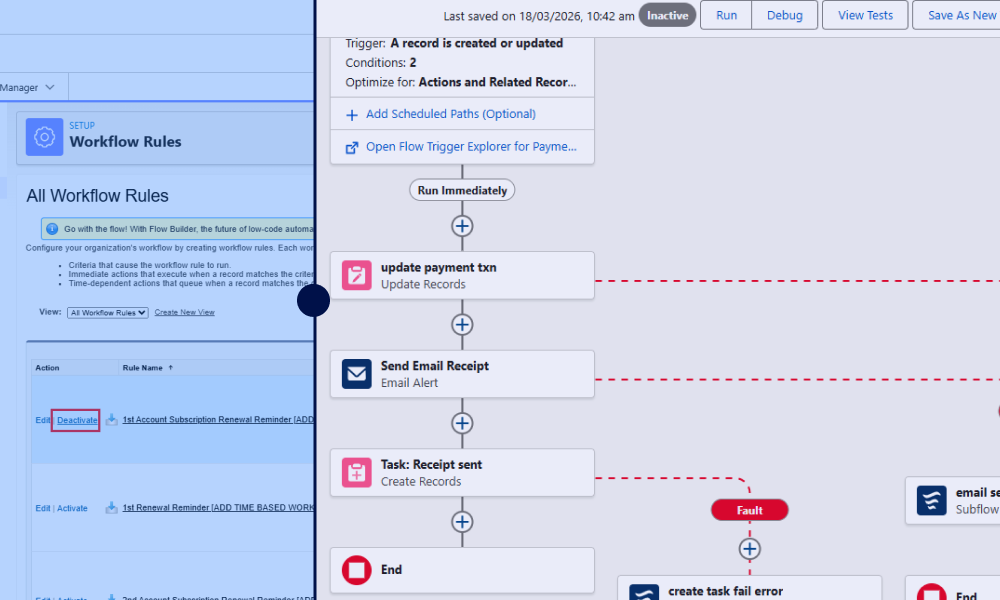
Moving from Salesforce Workflows to Flows: What Your Nonprofit Needs to Know
If you’ve spent any time in Salesforce recently, you’ve probably come across the shift from Workflows to Flows. It’s not a sudden change, but it is an important one.
Salesforce has been moving towards Flow as its main automation tool for a few years now. While your existing workflows will continue to run, the direction is clear. Flow is where future development and improvements are happening.
In this blog, we’ll take you through everything you need to know when transitioning from Workflows to Flows, so you can approach the change with confidence.
Best Practices for Moving from Workflows to Flows
Before jumping into the transition, it is worth taking a structured and steady approach. Most nonprofits do not need to rush, and taking the time to do this properly will reduce risk and rework later.
Start with one process at a time. Rather than migrating everything at once, choose a simple workflow to begin with. This helps build confidence and gives you a clearer understanding of how Flows behave in your environment.
Always test before activating. Take the time to confirm that the Flow works as expected, especially for processes tied to donations, receipts, or recurring payments where accuracy is critical.
Avoid running both at the same time. When you are ready to switch, make sure the original workflow is deactivated before activating the Flow. This prevents duplicate actions such as multiple emails or updates.
Use this as an opportunity to review what you already have. Many organisations have workflows that were built some time ago and may no longer reflect current processes. Moving to Flows is a good chance to simplify and improve.
Keep a record of what you change. Documenting your migration will make it easier to manage your setup over time, particularly if multiple people are involved.
Migration Considerations
Before you begin transitioning, it is important to understand what is currently in place.
Start by identifying which workflows are actively being used. Some may no longer be relevant, while others could be critical to your fundraising and supporter experience. This will help you prioritise what to migrate first.
Look at the complexity of each workflow. Simple updates are usually quick to transition, while workflows with multiple conditions, alerts, or integrations may require more careful planning and testing.
It is also worth checking for dependencies. Workflows can be connected to other automation, validation
rules, or processes in your org. Understanding these connections will help avoid unexpected outcomes.
Timing matters as well. Try to avoid making changes during busy campaigns or key fundraising periods where stability is essential.
What Payments2Us Has Released
To support this transition, Payments2Us has included Flow equivalents for existing workflows as part of the latest release.
Your current workflows will continue to run as they do today, so there is no immediate impact to your processes.
For each workflow, a corresponding Flow has been created and included in your org. These Flows are set to inactive by default, giving you full control over when and how you choose to adopt them.
This approach allows you to review, test, and transition at your own pace, without disrupting your existing setup.
You also have the flexibility to clone these Flows, make adjustments to suit your organisation’s requirements, and activate your customised version when ready.
For new customers, these Flows will be activated by default, ensuring new implementations are aligned with Salesforce best practice from the start.
For step by step guidance, you can also review our migration guide.
What This Means for Your Organisation Right Now
There is no need to take immediate action.
Your existing workflows will continue to operate as expected, and your donation, event, membership, and recurring payment processes will not be affected.
This update is about preparing for the future, not forcing change today.
You can choose when to begin transitioning based on your organisation’s priorities, internal capacity, and any broader Salesforce work you may already have planned.
Why Salesforce Flows Are Worth Moving To
While there is no urgency to switch immediately, Flows do offer clear benefits as your organisation grows.
Flows allow for more flexible and advanced automation. This means you can better support processes like tailored supporter journeys, conditional logic, and multi step interactions without needing multiple tools.
They also provide greater visibility. It is easier to see how your automation works, which makes ongoing maintenance and troubleshooting more manageable.
For nonprofits, this can translate into smoother donation processes, more reliable communications, and less manual work for your team.
Need Support?
If you are planning your transition or want help reviewing your current setup, our team is here to support you. Reach out to our support team and we can guide you through the next steps.