.png)
.png)
The Ultimate Guide to UTM Tracking with Payments2Us Studio
Turn every link into insight and every campaign into improvement.
When you’re running fundraising campaigns across email, social media, and paid ads, it’s easy to lose sight of what’s actually working. You might see donations come in, but where did they start? Which campaign drove them?
That’s where UTM tracking comes in.
With a few small tweaks to your campaign links, you can start uncovering exactly which channels, messages, and platforms inspire supporters to take action.
In this guide, we’ll walk you through everything your nonprofit teams need to know about UTM tracking, what it is, why it matters, and how to use it to make smarter, data-informed fundraising decisions.
What are UTM parameters?
UTM stands for Urchin Tracking Module, a small set of codes added to the end of a URL that tell analytics tools where traffic is coming from.
Here’s what a tagged link looks like:
.png)
Each of those “utm_” tags gives context about the click:
utm_source = where the supporter came from (e.g. Facebook)
utm_medium = what kind of channel it was (e.g. social, email)
utm_campaign = which specific campaign the link relates to
When someone clicks that link, the tags get sent to your analytics tool (like Google Analytics 4), so you can see exactly which channels and messages are driving visits and conversions.
Why UTM tracking matters for nonprofits
Most nonprofits juggle multiple campaigns at once appeals, newsletters, social posts, ads, even ambassador links. Without clear tracking, it’s impossible to know which ones actually drive donations.
UTM tracking helps you:
Understand which channels convert best
See whether email, social, or ads bring in more donors.Measure campaign performance over time
Compare one appeal to another — for example, how did this year’s EOFY campaign perform against last year’s?Report results clearly to leadership or funders
Data-backed reporting helps you show what worked and where to invest next.Optimise your messaging
Learn what kinds of stories, calls-to-action, or visuals resonate most with your supporters.
Ultimately, UTM tracking turns marketing from guesswork into insight and that means more effective fundraising.
The five UTM parameters you should know
There are five core tags you can use. You don’t need all of them every time, but it’s good to understand what each does.
.png)
Quick tip:
Keep your naming consistent. “Facebook” and “FB” will appear as two separate sources in reports. Set up a shared naming guide or spreadsheet so everyone uses the same terms across campaigns.
How to create UTM links
You can build UTM-tagged links manually, but it’s much easier to use a free link builder such as Google Campaign URL Builder
Simply paste in your base URL, fill in the campaign details, and copy the final link.
You can then share that link in your email campaign, social media post, or ad, pretty much anywhere supporters might click from.
If your link looks too long, you can shorten it with tools like Bitly or Pixel.fy before sharing.
Examples of how nonprofits can use UTM tracking
A. End-of-Year Appeal
You send a supporter email and also run social ads.
Email link:
utm_source=newsletter&utm_medium=email&utm_campaign=eoy_appealFacebook ad link:
utm_source=facebook&utm_medium=social&utm_campaign=eoy_appeal
When you review analytics, you can clearly see which channel delivered more clicks, conversions, etc.
B. Regular Giving Recruitment
You want to test two different messages for your monthly giving campaign.
Message A:
utm_content=join_todayMessage B:
utm_content=impact_story
Compare which one brings in more regular donors and refine future messaging accordingly.
C. Ambassador or Corporate Partner Links
If you have partners sharing your campaign, assign each a unique source tag.
Partner 1:
utm_source=company_a&utm_campaign=workplace_givingPartner 2:
utm_source=company_b&utm_campaign=workplace_giving
You’ll instantly know which partnerships are driving the most donations and can send tailored thank-you updates.
Where to see your UTM data
Once your UTM links are live, and your analytics tracking snippets are connected to Studio, you can start seeing clear results in tools like:
Google Analytics 4 (GA4) – see which sources and campaigns bring in visitors and conversions
Meta Ads Manager – track ad performance tied to tagged URLs
Marketing automation platforms – monitor how different campaigns perform across email and social
You’ll start to recognise patterns like which channels drive the most conversions, which ones have high traffic but low donations, and which deserve more investment next time.
Turning UTM data into insight
Once you’ve collected enough data, start analysing the stories behind the numbers.
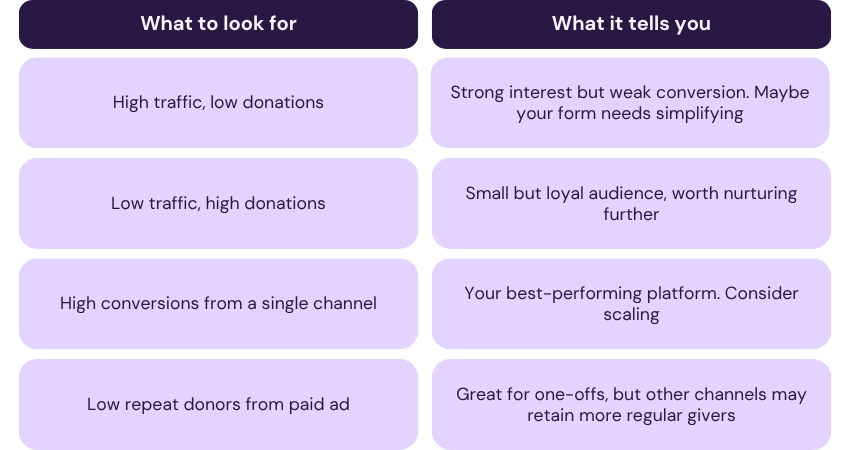
You can use this insight to plan smarter campaigns, target messages more effectively, and focus on what truly drives impact.
Common UTM mistakes to avoid
Inconsistent names
“Facebook” vs “FB” breaks your reporting. Stay consistent.Spaces or capital letters
Always use lowercase and underscores instead of spaces.Forgetting to tag internal links
Even links in your own newsletters should have UTMs.Changing URLs mid-campaign
Keep them stable for reliable data.Over-tagging
Use what you need. Too many parameters make analysis messy.
Next steps
If you haven’t already, start small:
Choose one upcoming campaign.
Create and connect your Studio page to your campaign
Tag your links with
source,medium, andcampaign.Check your analytics after a week or two.
Share what you learn with your team.
You’ll be amazed at how quickly insight builds momentum and how much smarter your fundraising becomes once you can see what truly works.